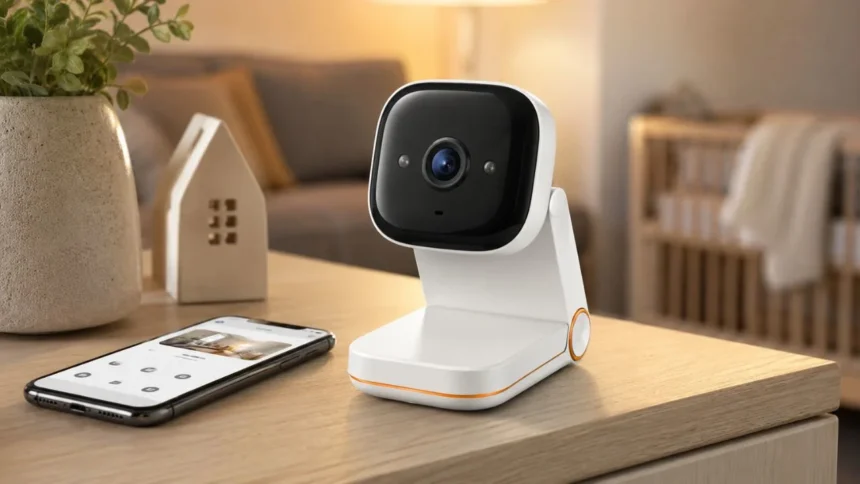
Indoor security cameras can help you check on your home, pets, children, or belongings when you are in another room or away from the property. However, many people feel uncomfortable placing a camera inside a private living space. The Energizer Smart WiFi Foldable Indoor Security Camera attempts to balance remote monitoring with a design that can be physically folded away when recording is not wanted.
The camera connects to the Energizer Connect app, allowing users to access a live video feed, receive motion alerts, review recordings, and communicate through two-way audio. The current 2K model also offers night vision, a wide viewing angle, activity-zone controls, and flexible storage. These features place it among compact smart home cameras designed for everyday indoor monitoring.
One of its most distinctive features is the foldable privacy design. Instead of relying only on an app setting, users can lower the camera so its lens no longer faces the room. This physical action provides a clear visual reminder that the camera has been repositioned, which may feel more reassuring than trusting a software privacy mode alone.
This guide explains how the Energizer Smart WiFi Foldable Indoor Security Camera works, what its main features offer, and where its limitations may become noticeable. It also covers installation, Wi-Fi requirements, storage options, privacy considerations, troubleshooting, and the types of households that may find the camera most useful.
What Is the Energizer Smart WiFi Foldable Indoor Security Camera?
The Energizer Smart WiFi Foldable Indoor Security Camera is a compact, wired home-monitoring device designed for indoor use. It sits on a desk, shelf, cabinet, or another stable surface and connects to a nearby electrical outlet. Once connected to Wi-Fi, it can send live video, recordings, and motion notifications to the Energizer Connect mobile application.
The current 2K QHD version uses a wide-angle lens to capture a broad section of a room. It includes night vision for darker conditions and a microphone and speaker for two-way communication. Motion detection allows the camera to begin monitoring activity and notify the account holder when movement occurs inside a selected area.
Unlike battery-powered security cameras, this model uses continuous wired power through a USB cable and power adapter. Wired operation means users do not need to remove the camera regularly for charging. The trade-off is that the installation location must be close enough to an outlet and suitable for routing the power cable safely.
Energizer has released closely named indoor camera models with different specifications, so checking the SKU is important. This article primarily discusses the current 2K EIX1-1005-2KW listing. Other Energizer foldable cameras may offer 1080p video, dual-band Wi-Fi, 360-degree rotation, or an additional light, depending on the exact model purchased.
Key Features of the Energizer Foldable Indoor Camera
The main feature is 2K Quad HD video, which offers more visual detail than a basic 1080p feed under suitable conditions. This can make it easier to see faces, clothing, pet activity, or objects across a room. Actual clarity will still depend on lighting, internet performance, camera placement, app compression, and the distance between the camera and subject.
A 130-degree field of view allows the camera to cover a relatively wide indoor area without motorised panning. Placing it in a corner or against a wall can provide a useful overview of a living room, entrance, office, or pet area. Careful positioning is important because the fixed viewing direction cannot automatically follow movement around the room.
Motion detection sends alerts when activity is noticed, while activity zones help users focus on specific parts of the image. For example, a person may monitor a doorway while reducing alerts from a television or frequently used pet bed. These controls can make notifications more useful, although some false alerts may still occur.
Other notable features include infrared night vision, two-way audio, remote live viewing, cloud storage support, and microSD recording. The foldable structure provides a simple physical privacy option when monitoring is unnecessary. Together, these features create a practical entry-level security camera rather than a professionally monitored alarm or advanced surveillance system.
How the Foldable Privacy Design Works
The camera can be physically folded down so the lens no longer has an open view of the room. This design provides an immediate and visible privacy action when users return home, host visitors, or enter a personal space. It may be especially appealing in bedrooms, home offices, living rooms, or other areas where constant camera visibility feels uncomfortable.
A physical privacy movement can be easier to understand than an app-only switch. Anyone in the room can see that the lens has been lowered rather than having to trust that recording has stopped remotely. This feature may also help families establish clear household rules about when indoor monitoring is acceptable and when the camera should remain folded.
The foldable design does not remove the need for responsible account security. A camera is still a connected device with a microphone, app account, recordings, and network access. Users should keep its software updated, protect the Energizer Connect account, review shared access, and position the camera so it does not capture unnecessarily private areas.
It is also worth remembering that folding the camera changes the lens position manually. The standard model is not the same as a motorised pan-and-tilt camera that can be directed around a room through the app. Users who need remote directional control should confirm whether a different Energizer model would better match their monitoring needs.
Video Quality and Wide-Angle Coverage
The 2K QHD resolution is one of the camera’s strongest specifications. When lighting and network conditions are good, the higher pixel count can provide a clearer picture than many basic indoor cameras. This extra detail may help users distinguish what a pet is doing, see whether a person entered a room, or review an event after receiving an alert.
Resolution alone does not determine image quality. Lens performance, exposure, contrast, compression, motion blur, and available light all influence what users actually see. A 2K label should therefore be treated as one part of the viewing experience rather than a guarantee that every moving subject or distant detail will appear perfectly sharp.
The 130-degree viewing angle is useful for covering a broad indoor space. A camera placed diagonally across a room may show an entrance, seating area, and part of the floor at the same time. Placing the camera too close to a wall or large object can waste part of that wide view and create unnecessary blind spots.
Before finalising the position, users should open the live feed and walk through the area they want to monitor. This simple test reveals whether faces are visible, important entrances are covered, and bright windows are affecting exposure. Adjusting the camera by a small amount can often improve coverage more than changing a digital setting.
Night Vision for Monitoring Dark Rooms
The camera includes night vision so it can continue showing activity when ordinary room lighting is low or completely switched off. Infrared illumination allows the device to create a visible image without using a bright lamp. The resulting video may appear in black and white rather than the full colours visible during daylight.
Night vision can be useful for monitoring hallways, pet areas, living rooms, or entrances after bedtime. It allows users to check whether an unusual sound came from a family member, pet, moving curtain, or another source. The feature may also help capture activity that occurs while the property is unoccupied at night.
The quality of infrared video depends heavily on placement. Reflective glass, glossy surfaces, mirrors, nearby walls, and objects directly in front of the lens can cause glare or overexposure. Pointing an indoor camera through a window at night is particularly unreliable because its infrared light may reflect from the glass and obscure the outdoor scene.
For the best result, keep the lens clean and give the camera an unobstructed view of the room. Test the image with the lights switched off rather than assuming the daytime position will work equally well at night. A small change in angle may prevent infrared reflection and produce a clearer picture of the monitored area.
Motion Detection, Alerts, and Activity Zones
Motion alerts are designed to notify users when the camera detects activity. A phone notification can prompt the user to open the Energizer Connect app and investigate the event. This can be helpful when monitoring an empty property, checking whether children have returned home, or learning when a pet enters a restricted area.
Not every motion event represents a security concern. Pets, changing sunlight, moving curtains, television screens, fans, and people regularly walking through a room may all generate alerts. Excessive notifications can quickly become annoying, causing users to silence the app and potentially miss an event that genuinely deserves attention.
Activity-zone selection allows the user to define which parts of the camera view should receive closer attention. A zone might cover an entrance, staircase, cabinet, or doorway while excluding an area with frequent harmless movement. Thoughtful zone placement can reduce unnecessary alerts and make the camera more practical for daily use.
Users should test motion settings over several days rather than expecting the first configuration to be perfect. Start with the most important area, review which events trigger notifications, and adjust the camera angle or selected zone where necessary. The goal is to receive enough information to stay aware without turning every ordinary movement into an interruption.
Two-Way Audio and Remote Communication
Two-way audio uses the camera’s built-in microphone and speaker to support conversation through the Energizer Connect app. A user can listen to sounds near the camera and speak from a phone while away from the room. This makes the device useful for more than simply watching a silent video feed.
Pet owners may use two-way audio to speak to a dog or check whether unusual barking continues. Parents may communicate with an older child in another room, while household members can use it to respond to someone entering a monitored area. The feature may also allow users to address an unexpected visitor inside the property.
Audio quality can vary with room acoustics, phone volume, internet speed, background noise, and the distance between the person and camera. Conversations may include a brief delay, so the experience may not feel as natural as a phone call. Placing the device near loud appliances or televisions may also make voices difficult to understand.
Two-way audio should be used thoughtfully because people may not expect to be heard through an indoor camera. Household members, carers, guests, and employees should understand where cameras and microphones are present. Clear communication about monitoring is both respectful and important for complying with privacy and recording rules in the relevant location.
Using the Energizer Connect App
The Energizer Connect app acts as the main control centre for the camera. After pairing the device, users can access the live feed, review available footage, manage alerts, select activity zones, and use two-way audio. Remote access makes it possible to check the room from another part of the home or while travelling.
The app can also support multiple Energizer cameras, allowing users to monitor more than one indoor area from the same account. This may be useful for a household with separate entrance, living-room, pet, or office cameras. Organising devices with clear names prevents confusion when a notification appears or a live feed needs to be opened quickly.
Account access should be limited to trusted people. Users should review who can view the cameras, remove access that is no longer required, and avoid sharing one password among numerous household members. A unique password and any available account-verification protection can reduce the risk of unauthorised access to live feeds or stored recordings.
App features and menus can change after software updates, so the latest interface may differ from older guides or videos. Keeping the mobile application and camera firmware updated can improve stability and security. Users should download the official Energizer Connect app through the recognised Apple or Google application store rather than an unfamiliar third-party source.
How to Set Up the Energizer Smart WiFi Camera
Begin by choosing a stable indoor surface close to a power outlet and within reliable Wi-Fi coverage. Connect the camera using its USB cable and supplied power adapter. Keep the phone nearby, enable Bluetooth or location permissions when requested for setup, and make sure the mobile device is connected to the correct home network.
The standard EIX1-1005 setup uses a 2.4 GHz Wi-Fi connection. Users should confirm that their router is broadcasting this frequency and that the phone is connected appropriately during pairing. Some modern routers combine 2.4 GHz and 5 GHz under one network name, which may occasionally complicate the initial connection process.
Download the Energizer Connect app, create or access an account, and choose the option to add a camera. Follow the app instructions, confirm the camera’s indicator light is in pairing mode, and enter the Wi-Fi credentials carefully. The setup process may display a QR code that needs to be shown directly to the camera lens.
After connection, assign the camera to a room and give it a clear name. Open the live view, check the angle, test motion notifications, and confirm that two-way audio works. Users planning to record locally should insert a compatible microSD card and format or activate it through the app if the software requests this step.
Wi-Fi Requirements and Connection Reliability
The primary 2K foldable model connects to a 2.4 GHz Wi-Fi network. This frequency is commonly used by smart home devices because it generally reaches farther through walls than 5 GHz. However, network performance can still decline when the camera is far from the router or surrounded by thick walls, metal, or electronic interference.
A strong internet connection is also needed for smooth remote live viewing and cloud access. When upload speed is weak, the video may load slowly, lose detail, or disconnect. Local microSD recording may still provide useful footage, but remote notifications and app access depend on the camera maintaining an active network connection.
Users experiencing repeated disconnections should first test the camera closer to the router. Restarting the router, camera, and phone may resolve temporary problems. It is also helpful to confirm that the Wi-Fi password is correct, the network is not hidden, and the router is not blocking new smart home devices through advanced security settings.
Some newer Energizer foldable camera variants support both 2.4 GHz and 5 GHz Wi-Fi. Buyers should not assume this applies to every model with a similar name. Checking the SKU, box, official listing, and manual before installation prevents confusion and ensures the selected camera matches the available home network.
Cloud Storage and MicroSD Recording
The camera offers two main approaches to storing footage. Users can access optional cloud storage or insert a microSD card for local recording. The current product information supports cards with capacity up to 128GB, although the memory card is normally purchased separately rather than included with the camera.
Local storage can be appealing to users who want to avoid an ongoing cloud subscription. The camera records footage to the installed card, and recordings can be accessed through the supported app functions. Storage duration depends on the card capacity, recording settings, video resolution, motion frequency, and whether older clips are overwritten automatically.
Cloud storage can make recordings accessible even if the camera or memory card is damaged, removed, or stolen. It may also simplify reviewing footage from another location. However, optional cloud plans can introduce recurring costs, and users should check retention periods, trial conditions, renewal pricing, and the features included with each plan.
Important recordings should be downloaded and stored separately rather than left indefinitely on a camera card or temporary cloud plan. Memory cards can fail, recordings may be overwritten, and account access can change. Valuable evidence or personal clips should be copied to another secure location as soon as possible.
Best Places to Position the Camera
A corner position often provides the widest usable view because it allows the 130-degree lens to look diagonally across the room. Placing the camera on a shelf or cabinet can help capture faces rather than only the lower part of people’s bodies. The lens should remain unobstructed by plants, decorations, books, or furniture.
Entrances, hallways, living rooms, and home offices are common monitoring locations. Pet owners may point the camera towards a bed, feeding area, or crate, while parents may use it in a shared family space. Avoid placing it where ordinary household activity will constantly trigger unnecessary alerts unless that movement is the purpose of monitoring.
Do not place the indoor camera outside or in an area exposed to rain, condensation, excessive humidity, grease, or extreme temperatures. It is designed for indoor use and may not have the weather protection required for outdoor security. A purpose-built outdoor camera is safer for gardens, driveways, porches, and external entrances.
Privacy should influence placement as much as security coverage. Avoid recording bathrooms, changing areas, neighbouring homes, or places where people reasonably expect complete privacy. Position the camera openly rather than hiding it, and explain its purpose to everyone who lives, works, or regularly spends time in the monitored property.
Can It Be Used as a Pet or Baby Camera?
The camera can be useful for checking on pets because it provides live video, motion alerts, night vision, and two-way audio. Owners can see whether an animal is resting, pacing, barking, or entering a restricted area. Wired power also allows the camera to remain available without requiring frequent battery charging.
Pet movement may create numerous notifications, especially when the camera covers a busy room. Activity zones can help focus on a feeding station, door, sofa, or crate. Users should secure the cable so an animal cannot chew it, pull the camera down, or become tangled around the power connection.
The device may also help adults check a child’s room or shared play area, but it should not be treated as a specialised medical baby monitor. It may not include dedicated breathing alerts, regulated health features, battery backup, or the reliability required for safety-critical monitoring. Direct supervision and appropriate child-safety equipment remain essential.
Families using any indoor camera around children should review privacy, account access, microphone use, and recording storage. The foldable design is helpful when monitoring is unnecessary, but responsible use requires more than lowering the lens. Adults should understand who can access the feed and how long recordings remain available.
Privacy and Security Considerations
Any internet-connected indoor camera can create privacy risks if its account, router, application, or software is poorly protected. Start by using a unique password that is not shared with email, banking, or other smart home accounts. Avoid easy combinations based on names, birthdays, addresses, or commonly used words.
Keep the camera firmware, Energizer Connect app, phone operating system, and router updated. Updates can repair security weaknesses and improve compatibility. Automatic updates should be enabled where available, while old phones or routers that no longer receive support may need replacement before they are trusted with indoor camera access.
Review device sharing and remove users who no longer require access. Be cautious when signing into the app on shared phones, tablets, or public networks. Users should also check whether cloud recordings contain sensitive conversations, personal documents, computer screens, entry codes, or other information visible inside the camera’s wide view.
The foldable lens adds a useful physical privacy action, but it does not eliminate every digital concern. Users should still understand microphone behaviour, storage settings, remote access, and account permissions. For maximum privacy during sensitive conversations, disconnecting power provides a clearer separation than depending entirely on a software setting.
Advantages of the Energizer Foldable Camera
The camera combines several useful features in a relatively compact design. Its 2K resolution, wide viewing angle, night vision, motion alerts, two-way audio, app access, and storage choices cover the essential needs of many households. Hub-free installation can also make setup easier for users who do not already own a smart home controller.
The fold-down privacy design is a meaningful advantage over cameras that only provide a digital privacy mode. It gives people in the room a visible way to change the camera’s position. This can make an indoor security device feel less intrusive when monitoring is needed only during certain hours.
Local microSD support gives users an alternative to relying entirely on paid cloud storage. Wired power reduces the maintenance associated with rechargeable batteries and allows the camera to remain active continuously. The supplied USB cable also offers more placement flexibility than a camera with a very short fixed power lead.
The Energizer Connect app brings live viewing, alerts, recordings, and audio controls into one mobile interface. Households already using compatible Energizer smart products may appreciate managing several devices through the same application. The camera therefore works best as a simple, affordable monitoring tool rather than a highly advanced security platform.
Possible Limitations to Consider
The standard model uses wired power, so it cannot be placed freely without considering the nearest outlet. A visible cable may affect the appearance of a room and must be secured around children and pets. Power cuts can also disable the camera unless the outlet and router are connected to suitable backup power.
A fixed wide-angle camera cannot provide the same remote coverage as a motorised pan-and-tilt model. Users must position it correctly before leaving home, and activity outside its viewing direction will not be captured. The foldable movement supports privacy but does not replace app-controlled rotation on the standard version.
The 2.4 GHz requirement may cause setup difficulties for people unfamiliar with router bands. Cloud storage may also involve an optional subscription after the trial period. Buyers who prefer free long-term recording should include the cost of a suitable microSD card when calculating the complete purchase price.
Motion detection is useful but may not distinguish every important event from ordinary movement. False notifications and missed activity are possible with most affordable indoor cameras. Users seeking professional monitoring, emergency response, facial recognition, advanced person detection, or guaranteed continuous recording may need a more specialised security system.
How to Troubleshoot Common Problems
When the camera will not connect, confirm that the phone is using a 2.4 GHz Wi-Fi network and that the password has been entered correctly. Move the camera and phone closer to the router during setup. Reset the device only after checking its power, indicator light, app permissions, and pairing instructions.
When the QR code is not recognised, clean the camera lens and increase the phone screen brightness. Hold the phone directly in front of the lens, then move it slowly closer or farther away. Reflections, a cracked screen protector, poor lighting, or an incorrect display angle can make the code difficult for the camera to scan.
If the live feed is offline, check whether the camera still has power and whether other devices can access the internet. Restart the camera and router, then reopen the app. Repeated problems may indicate weak Wi-Fi coverage, network congestion, outdated software, or router settings that prevent the device from maintaining a connection.
For missing recordings, confirm that the microSD card is compatible, correctly inserted, and recognised inside the app. Review the recording schedule, motion settings, storage capacity, and cloud-plan status. Formatting the card may resolve certain problems, but it will normally erase existing footage, so important clips should be saved first.
Who Should Consider Buying This Camera?
The camera may suit renters or homeowners who want basic indoor monitoring without installing a separate hub. Its tabletop design and USB power allow it to be moved between rooms more easily than a permanently wired security system. It is particularly useful where a wide fixed view can cover the main area of interest.
Pet owners may benefit from remote video, movement alerts, night vision, and two-way audio. Travellers can check an entrance or living area while away, while home workers may use it to monitor another part of the property. Families can also use it for general household awareness when everyone understands and accepts the monitoring arrangement.
People concerned about indoor privacy may appreciate the physical foldable design. It provides a clear way to reposition the lens when the household is occupied or monitoring is inappropriate. However, users who prefer cameras with fully automated privacy shutters, local-only operation, or no cloud connection should compare other options carefully.
The standard version may not be ideal for users who need outdoor protection, battery operation, remote pan-and-tilt movement, or advanced artificial-intelligence detection. Checking the exact requirements before buying is important because another Energizer camera—or a different type of security product—may be better suited to those needs.
Is the Energizer Smart WiFi Foldable Camera Worth It?
The camera may be worth considering for users who want straightforward indoor monitoring with useful privacy control. It covers the core features expected from a modern smart camera, including 2K video, night vision, motion alerts, activity zones, app access, two-way audio, and both local and cloud storage choices.
Its strongest point is not one technical specification but the balance between monitoring and physical privacy. Folding the lens down is simple, visible, and easy for household members to understand. That design can make the product feel more suitable for shared living spaces than a camera that appears to watch the room continuously.
Value will depend on the exact model, price, storage plan, and intended use. Buyers should confirm the SKU because Energizer offers similarly named models with different resolutions, Wi-Fi capabilities, movement features, and lighting. The cost of a microSD card or optional cloud subscription should also be included in the decision.
For basic indoor awareness, pet monitoring, and remote room checks, the camera offers a practical range of features. It should not be viewed as a complete replacement for locks, alarms, smoke detectors, direct supervision, or professionally monitored security. Its role is to provide convenient visibility and recorded information within a broader safety plan.
Final Verdict
The Energizer Smart WiFi Foldable Indoor Security Camera is designed for people who want to monitor an indoor space without leaving a camera openly pointed at the room all the time. Its foldable body provides an easy physical privacy option, while the Energizer Connect app supports remote viewing and device control.
The current 2K model combines a 130-degree field of view with night vision, motion alerts, activity zones, and two-way audio. Wired USB power keeps the device running without regular charging, and users can choose between optional cloud storage and a microSD card for recorded footage.
Its main limitations are the need for an outlet, a fixed viewing direction, potential Wi-Fi setup challenges, and possible additional storage costs. It is also important to distinguish the standard 2.4 GHz model from newer Energizer foldable variants that may add dual-band connectivity, remote rotation, or an integrated light.
Overall, it is a sensible option for simple home, pet, or room monitoring when buyers value physical privacy and flexible storage. Careful placement, secure account settings, reliable Wi-Fi, and realistic expectations will determine whether the camera becomes a useful part of the home or another device that generates unnecessary alerts.
Does the Energizer Smart WiFi Foldable Camera require a subscription?
A subscription is not required for basic camera ownership or microSD storage. Optional cloud storage may require payment after the available trial period, so check the current plan before activating it.
Does the Energizer foldable indoor camera work with 5 GHz Wi-Fi?
The standard EIX1-1005 model is designed for 2.4 GHz Wi-Fi. Some newer Energizer foldable models support both 2.4 GHz and 5 GHz, so verify the exact SKU before purchasing.
Can the camera record without the internet?
A microSD card may allow local recording, but app access, remote viewing, alerts, and cloud features require a working network connection. Exact offline behaviour can depend on the camera settings.
How much storage does the Energizer indoor camera support?
The current product information states that the camera supports a microSD card of up to 128GB. The card is generally sold separately and recording time depends on video and motion settings.
Can I use the Energizer foldable camera outdoors?
No, this model is designed for indoor use. Exposure to rain, condensation, extreme temperatures, or outdoor moisture may damage it, so an outdoor-rated camera should be used instead.