
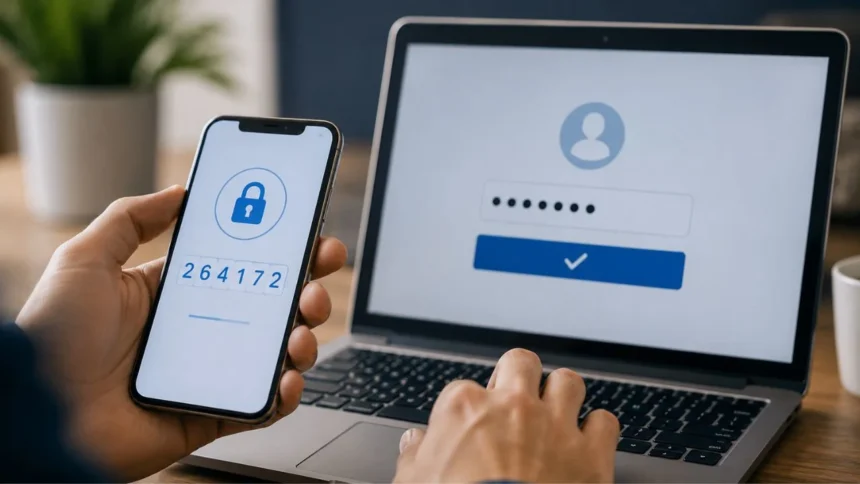
Two-factor authentication protects an account by requiring two different types of evidence before access is granted. A common example is entering your password and then providing a temporary code generated by an authenticator app. The password proves something you know, while the phone holding the authenticator proves something you have.
Another strong example is using a password followed by a physical security key. The password is a knowledge factor, and the security key is a possession factor. An attacker would generally need both pieces to sign in, making the account much harder to compromise through a stolen password alone.
Two-factor authentication is often shortened to 2FA and may also be described as two-step verification. However, performing two actions does not automatically mean two different factors are being used. A password followed by a security question uses two knowledge-based checks and is not true two-factor authentication.
Understanding this distinction helps you answer security questions accurately and choose safer login settings for email, banking, social media and work accounts. This guide explains authentication factors, real 2FA examples, common misconceptions, phishing-resistant options and practical ways to secure your accounts.
The Direct Answer
The clearest example of two-factor authentication is entering a password and then entering a code from an authenticator app. The password is something you know, while the authenticator app is available on something you possess. These are two separate authentication-factor categories.
A password followed by a text-message code is also commonly treated as two-factor authentication. The password represents knowledge, and access to the registered phone number represents possession. Although this method is stronger than using a password alone, it has security weaknesses discussed later in this guide.
A password combined with a fingerprint is another valid example. The password is a knowledge factor, while the fingerprint represents an inherence factor based on a physical characteristic. This combination is commonly used to protect mobile applications, devices and sensitive workplace systems.
By contrast, a password followed by a PIN is usually not true 2FA when both are simply memorised secrets. They belong to the same knowledge category. The central rule is that two-factor authentication requires evidence from two different factor types, not merely two separate login screens.
What Is Two-Factor Authentication?
Two-factor authentication is a security method requiring two distinct forms of identity verification. The account does not grant access after checking only a password. It asks for another factor that belongs to a different category, creating an additional barrier against unauthorised login attempts.
The second factor becomes valuable when the first one is stolen. A criminal may obtain a password through phishing, malware, password reuse or a data breach. Without access to the registered device, security key or biometric check, the stolen password may not be enough to enter the account.
Two-factor authentication is a form of multi-factor authentication. Two-factor authentication uses exactly two different factor types, while multi-factor authentication may use two or more. In everyday conversation, people often use 2FA and MFA interchangeably because most services request only two factors.
The strength of 2FA depends on the methods being combined. A hardware security key offers stronger phishing protection than an SMS code, even though both can act as possession factors. Enabling any legitimate second factor is normally an improvement, but some choices provide much better protection than others.
The Three Main Authentication Factors
Authentication factors are generally grouped into three main categories: something you know, something you have and something you are. A true two-factor login combines methods from at least two of these categories. Understanding them makes it easier to recognise correct examples in quizzes, examinations and real account settings.
Something you know includes information stored in your memory. Passwords, passphrases and personal identification numbers are common knowledge factors. Security questions can also fall into this category, although their answers are frequently weak because they may be guessed or discovered online.
Something you have is a physical or digital possession linked to the account. Examples include a phone containing an authenticator app, a hardware security key, a smart card or a trusted device. The service requires proof that the person signing in has access to that possession.
Something you are refers to inherence factors based on physical or behavioural characteristics. Fingerprints, facial recognition and iris scans are common examples. Biometric systems generally compare a new measurement with protected data previously enrolled on the device or service.
Something You Know: The Knowledge Factor
A password is the most familiar knowledge factor. It should be known only to the legitimate account holder and difficult for another person to guess. Long, unique passwords provide more protection than short words, dates or predictable changes to reused credentials.
A PIN is also a knowledge factor because the user remembers it. PINs can be secure when they unlock a protected device locally, especially when the device limits repeated guesses. However, combining a password with a separate memorised PIN does not necessarily create true two-factor authentication.
Security questions are weak knowledge checks. Information such as a mother’s maiden name, school or hometown may be available through social media, public records or ordinary conversation. Even invented answers remain another secret that can be typed into a fake login page.
Two knowledge checks do not become 2FA simply because they appear on different screens. A password followed by a security question still depends entirely on information the user knows. A legitimate second factor should come from another category, such as possession or inherence.
Something You Have: The Possession Factor
A possession factor proves that the user controls a registered object or device. An authenticator app creates changing login codes on a phone, while a hardware security key uses cryptographic technology to respond to a sign-in request. Both rely on something physically or digitally held by the user.
Text-message verification treats control of a registered phone number as a possession factor. The service sends a one-time code, and the user enters it after the password. This method is convenient because it works on basic mobile phones without requiring a separate application.
Smart cards are another possession factor commonly used by governments and large organisations. The employee inserts or taps the card and may enter a PIN to activate it. The combination of the card and PIN can provide possession plus knowledge.
Possession factors need secure recovery procedures. A user may lose a phone, damage a security key or replace a device. Backup methods should restore legitimate access without becoming an easy route for an attacker to bypass the stronger authentication method.
Something You Are: The Biometric Factor
Biometric authentication uses a measurable personal characteristic to verify identity. Fingerprint scanning and facial recognition are common on phones and laptops, while iris recognition may be used in specialised security environments. These checks can make authentication faster because there is no code to type.
A password followed by a fingerprint is a clear two-factor example. The password is something the user knows, and the fingerprint is something the user is. An attacker who learns the password would still need to pass the biometric verification process.
Biometric information requires careful protection because it cannot be changed as easily as a password. Well-designed consumer devices usually process fingerprints or facial information locally and do not send the raw biometric image to every website being accessed.
Biometrics are not perfect. Injuries, lighting, camera quality and similar-looking individuals can affect recognition. Secure systems normally provide a PIN, password or another approved recovery process when the biometric check cannot be completed.
Password Plus Authenticator App
A password combined with an authenticator-app code is one of the most widely recommended forms of everyday 2FA. After the password is accepted, the user opens an application that displays a short numerical code changing at regular intervals.
The password is the knowledge factor, while the registered phone or application seed acts as the possession factor. A criminal who steals only the password cannot normally generate the correct current code without also compromising the authenticator setup.
Authenticator apps do not depend on mobile network reception for ordinary time-based codes. This makes them useful while travelling or working in an area with weak signal. The app can continue generating codes as long as the phone’s time remains reasonably accurate.
These codes can still be stolen through a convincing phishing website. An attacker may ask the victim to enter both the password and current code, then use them immediately. Authenticator apps are stronger than password-only access but are not as phishing-resistant as a properly configured FIDO security key.
Password Plus SMS Code
A password followed by a code sent through SMS is a recognisable example of two-factor authentication. The account checks something the user knows and then checks access to a registered phone number. This additional requirement blocks many basic password-reuse attacks.
SMS is popular because it requires no special application or hardware. Users already understand text messages, and businesses can support the method across many types of mobile phone. It is often better than leaving an account protected by only a password.
However, text-message codes can be vulnerable to SIM-swapping, mobile-account takeover, message interception and phishing. A criminal may persuade a network provider to transfer the victim’s number or trick the victim into entering the code on a fraudulent website.
Choose an authenticator app, security key or passkey when the service provides a stronger option. SMS can remain a useful fallback when no better method is available, but it should not be considered the strongest possible protection for email, financial or administrative accounts.
Password Plus Security Key
A password combined with a hardware security key is a strong form of two-factor authentication. After entering the password, the user connects or taps the registered key through USB, NFC or another supported method. The key then completes a cryptographic challenge.
The password supplies the knowledge factor, while the physical key supplies the possession factor. The private cryptographic material remains protected on the key instead of being manually entered by the user. This makes the process harder for an attacker to copy.
FIDO security keys are phishing-resistant because they verify the legitimate website during authentication. A fake page cannot normally use the security key to sign in to the real account. This provides an important advantage over codes that users can accidentally type into a fraudulent form.
Security keys are especially useful for administrators, journalists, financial professionals and people who face higher account-takeover risks. Registering a second backup key and storing it safely can prevent permanent lockout when the main key is lost or damaged.
Password Plus Fingerprint
A login requiring a password followed by a fingerprint uses knowledge and inherence factors. This is a valid example of two-factor authentication when the two checks independently contribute to the account’s authentication process.
This combination is commonly found in financial applications, workplace devices and secure facilities. The user first proves knowledge of a secret and then presents a physical characteristic. Both checks must succeed before the protected information becomes available.
A fingerprint does not travel through the internet in the same way as a password when the system is properly designed. The device can verify the print locally and send confirmation that the approved biometric check succeeded.
The system still needs a secure fallback when the sensor fails or the user cannot provide the enrolled fingerprint. That recovery method should not be so weak that an attacker can simply avoid the biometric check and reset the account through easily guessed personal information.
Smart Card Plus PIN
A smart card combined with a PIN is another classic two-factor authentication example. The card represents something the user has, while the PIN represents something the user knows. Both are required to activate the credential and access the protected system.
Organisations may issue smart cards to employees for workstation login, building access or digital signatures. The card stores protected cryptographic credentials, and the PIN prevents someone who finds the card from using it immediately.
This method can provide strong security when the card, reader and account-management process are properly configured. The organisation can revoke a lost card, issue replacements and require separate credentials for highly sensitive administrative work.
A bank card and PIN follow a similar factor pattern during many in-person transactions. The physical card is the possession factor, while the secret PIN is the knowledge factor. Contactless transactions below certain limits may not always require both factors for every payment.
Which Examples Are Not Two-Factor Authentication?
A username and password are not two factors. The username generally identifies the account rather than proving the user’s identity, while the password performs the authentication. Adding an email address to a login form does not create another security factor.
A password and security-question answer are also not true 2FA. Both depend on knowledge. The attacker only needs to discover or guess two pieces of information rather than obtaining a separate possession or biometric factor.
A password followed by another password remains single-factor authentication. The same principle applies to a password and PIN when both are simply entered from memory. Multiple secrets can create additional difficulty, but they do not satisfy the strict definition of different authentication factors.
Entering the same password twice is not 2FA either. The second entry may confirm that the user typed it correctly during account creation, but it does not provide independent evidence of identity. Repetition is not the same as a second factor.
Two-Factor Authentication vs Two-Step Verification
Two-step verification means that a login involves two separate steps. In many services, those steps also use two different factors, making the process functionally equivalent to two-factor authentication. The terms are therefore often used interchangeably in consumer settings.
The difference becomes important when both steps use the same factor type. A password followed by a different memorised answer is two-step verification in a broad procedural sense, but it is not strict two-factor authentication because both checks rely on knowledge.
Some services use “two-step verification” as the product name even when they support authenticator apps, security keys and SMS codes. The branding does not change the underlying factor categories. You must examine what the user actually provides during login.
For an examination question, choose the option combining different factor types. Password plus fingerprint, password plus authenticator code or smart card plus PIN are valid. Two passwords, password plus security question or username plus password are not.
Two-Factor Authentication vs Multi-Factor Authentication
Two-factor authentication uses two different authentication-factor categories. Multi-factor authentication is the broader term for a process requiring two or more factors. Every genuine 2FA process is MFA, but an MFA process may involve more than two forms of evidence.
A high-security system might require a smart card, PIN and fingerprint. This combines possession, knowledge and inherence. It is three-factor authentication because all three major factor types contribute to the decision.
Adding several checks from one category does not necessarily create MFA. Three passwords are still three knowledge checks rather than three-factor authentication. Factor diversity matters more than the number of fields or screens presented.
In practice, most online services use two factors because they provide a useful balance between security and convenience. Requiring additional factors for every routine action could create unnecessary friction, so organisations apply stronger requirements to sensitive accounts or high-risk transactions.
What Is an Authenticator App?
An authenticator app is software that generates or receives an additional login check. Time-based authenticator apps commonly display six-digit codes that change every thirty seconds. The user enrols the app by scanning a QR code provided by the service.
The QR code contains a secret used to generate matching codes on the phone and service. Anyone who obtains that setup secret may be able to reproduce the codes, so screenshots and backup copies must be protected carefully.
Some authenticator apps support cloud backup or synchronisation across devices. This makes recovery easier when a phone is lost but increases the importance of protecting the account used for synchronisation with strong authentication.
Other apps send approval notifications instead of displaying codes. These can be convenient, but users must verify the sign-in details and reject requests they did not initiate. Approving an unexpected prompt can give an attacker access even when the password was protected by MFA.
What Is MFA Fatigue?
MFA fatigue occurs when an attacker repeatedly sends authentication approval requests to a user’s phone. The criminal hopes the person will eventually approve one through confusion, annoyance or the mistaken belief that it is required to stop the notifications.
This attack is also called push bombing or MFA prompt bombing. It becomes possible when the attacker already knows the password and the service relies on a simple approve-or-deny notification as the second factor.
Number matching improves push authentication by showing a number on the login screen that must be selected or entered in the app. This helps the user connect the approval request with the sign-in they actually initiated.
Never approve an unexpected authentication prompt. Change the account password, review recent login activity and report the event to the service or workplace security team. Repeated unexpected prompts often indicate that someone already possesses the correct password.
Why SMS Authentication Is Considered Weaker
SMS authentication depends on the security of the phone number and mobile network account. Attackers may use social engineering to transfer a victim’s number to another SIM card, allowing them to receive security codes intended for the legitimate user.
Text codes can also be captured through phishing. A fake website asks for the password and then immediately requests the SMS code. The attacker forwards both pieces to the real service before the temporary code expires.
Malware with access to messages or notifications may also expose codes. Shared phone plans, recycled numbers and weak mobile-provider account recovery create additional risk. These problems do not mean every SMS-protected account is easily compromised, but stronger alternatives reduce exposure.
Use SMS when it is the only second-factor option because it still protects against many attacks involving only a stolen password. Move to an authenticator app, FIDO security key or passkey when the service supports one of those safer choices.
What Is Phishing-Resistant Authentication?
Phishing-resistant authentication is designed to prevent a fake website from successfully collecting and reusing login credentials. The method verifies the legitimate website cryptographically rather than relying on the user to recognise the correct address every time.
FIDO security keys and properly implemented passkeys provide this protection. The credential is created for a specific website or application and will not authenticate an unrelated phishing domain that merely copies the original page’s appearance.
Temporary codes are not fully phishing-resistant because the user can type them into a fake form. The attacker may then submit the code to the real service immediately. Push notifications can also be abused when users approve them without confirming the sign-in details.
For the strongest available protection, prioritise passkeys or hardware-backed FIDO authentication. These methods can also improve convenience because the user confirms access with a device PIN, fingerprint or face scan instead of manually entering changing codes.
Are Passkeys Two-Factor Authentication?
A passkey is a cryptographic credential stored on a phone, computer, password manager or security key. The user activates it using the same method used to unlock the device, such as a fingerprint, face scan, PIN or device password.
Passkeys can combine possession of the registered device with local user verification. In that sense, they can provide multi-factor properties through something the user has and something the user knows or is. The exact assurance depends on how the service and device implement the process.
A passkey is often used as a password replacement rather than as an additional step after a password. The user may therefore complete one simple sign-in action while the technology performs stronger cryptographic verification behind the scenes.
This shows why counting screens is not the best way to judge authentication security. A passkey login may involve fewer visible steps than password-plus-SMS authentication while providing stronger resistance to phishing, credential reuse and stolen password databases.
Backup Codes and Account Recovery
Backup codes are emergency credentials provided when 2FA is enabled. They allow access when the user loses a phone or cannot use the normal second factor. Each code is generally intended for one-time use.
Store backup codes somewhere separate from the main device. A secure password manager, locked physical location or protected offline document can be appropriate. Keeping the only copy on the phone being used for authentication defeats their recovery purpose.
Backup codes behave like powerful knowledge credentials. Anyone who obtains one may bypass the usual second-factor device. Do not send them through unsecured messages, store them in public cloud documents or share them with someone claiming to provide technical support.
Account recovery must be protected as carefully as normal login. An attacker may ignore strong 2FA and instead target the recovery email, mobile provider or support desk. Review your recovery information regularly and remove old phone numbers or addresses you no longer control.
How to Enable Two-Factor Authentication Safely
Begin with your primary email account because it is commonly used to reset passwords for other services. Open the account’s official security settings rather than following a link from an unexpected email or text message.
Choose the strongest method available. A passkey or hardware security key is usually preferable, followed by an authenticator app. SMS is a reasonable option when stronger methods are unavailable, but the associated mobile account should have its own secure PIN or password.
Register a backup method before depending on 2FA. This may involve a second security key, another trusted device or securely stored recovery codes. Confirm that you understand the recovery process before signing out of all devices.
Test the setup by signing in from another trusted browser or device. Check that the second factor works and that login alerts reach you correctly. Never disable 2FA simply because one failed setup attempt created temporary inconvenience.
Common Two-Factor Authentication Mistakes
One mistake is approving every notification without checking it. Authentication prompts should appear only when you initiate a sign-in. An unexpected request may mean someone has obtained your password and is attempting to complete the login.
Another mistake is sharing a one-time code with a caller, message sender or supposed support representative. Legitimate staff should not need you to read out a temporary authentication code. The code is intended only for the sign-in page you deliberately opened.
Users sometimes enable 2FA but keep weak recovery options. An old email address or easily hijacked phone number can provide a bypass around the stronger login method. Security is limited by the weakest method capable of restoring access.
Failing to save backup codes is also common. People may then lose an account when a phone breaks or is stolen. A recovery plan should be created while normal access is still available rather than after an emergency occurs.
Benefits of Using Two-Factor Authentication
Two-factor authentication reduces the usefulness of a stolen password. An attacker who obtains credentials from a data breach cannot automatically enter the account without the possession or biometric factor required by the second step.
It also helps protect people who accidentally reuse passwords. Unique passwords are still essential, but 2FA creates another barrier when one reused credential becomes exposed. This can prevent one compromised service from leading directly to several account takeovers.
Login alerts and approval prompts can provide an early warning. An unexpected request may reveal that someone is attempting to access the account, allowing the user to change the password and review active sessions before further damage occurs.
For organisations, MFA helps protect remote work, email, cloud applications and administrator accounts. It reduces reliance on employees recognising every phishing attempt and makes common credential-based attacks more difficult to complete successfully.
Limitations of Two-Factor Authentication
Two-factor authentication does not make an account impossible to compromise. Attackers may steal active sessions, control the user’s device, exploit weak recovery processes or persuade someone to approve a fraudulent request.
Phishable methods such as codes can be captured in real time. A sophisticated fake website may relay the victim’s password and temporary code to the legitimate service, then take control of the authenticated session.
Malware running on an unlocked device may access information after authentication has already occurred. 2FA protects the login process but does not replace software updates, endpoint security, careful downloads or physical device protection.
Users must therefore treat 2FA as one security layer rather than a complete solution. Strong unique passwords, passkeys, phishing awareness, recovery protection and regular account reviews remain necessary.
Frequently Asked Questions
Which of the following is an example of two-factor authentication?
Entering a password and then a code from an authenticator app is a clear example. It combines something you know with something you have.
Is a password and PIN considered two-factor authentication?
Usually not, because both are knowledge factors remembered by the user. True 2FA combines different categories, such as a password and fingerprint.
Is a password and text-message code 2FA?
Yes, it combines a knowledge factor with possession of the registered phone number. However, authenticator apps and security keys generally provide stronger protection.
Is a fingerprint alone two-factor authentication?
No. A fingerprint by itself is one inherence factor. It becomes part of 2FA when combined with a different factor, such as a password or physical card.
What is the strongest form of two-factor authentication?
Phishing-resistant FIDO authentication using a hardware security key is among the strongest options. Passkeys can also provide highly secure, phishing-resistant sign-in without traditional passwords.
Conclusion
The correct example of two-factor authentication is a login combining two different factor types. A password followed by an authenticator-app code, security key or fingerprint meets this requirement because each check proves identity in a different way.
Two passwords, a password and security question, or a password entered twice do not provide true 2FA. They may involve several steps, but every check remains within the knowledge-factor category.
Not all two-factor methods provide equal protection. SMS codes and simple push approvals are better than password-only login, but they remain vulnerable to phishing and other attacks. Security keys and passkeys provide stronger resistance.
Enable the strongest authentication method offered by your important accounts, beginning with email. Protect recovery options, store backup codes safely and reject unexpected login prompts. These habits make stolen passwords far less useful to attackers.